充电宝微信客诉
项目背景
用户在使用充电宝业务时,通过微信发起诉讼,微信侧要求美团侧在24小时内进行回复响应,否则默认给用户退款。美团侧客诉服务之前都是通过太平洋系统调取微信侧工单线下回访解决客诉问题的,此方案大量消耗人工资源,此需求核心价值在于为及时响应微信侧请求,减少经济损失,形成线上自动化的回复处理。
产品方案
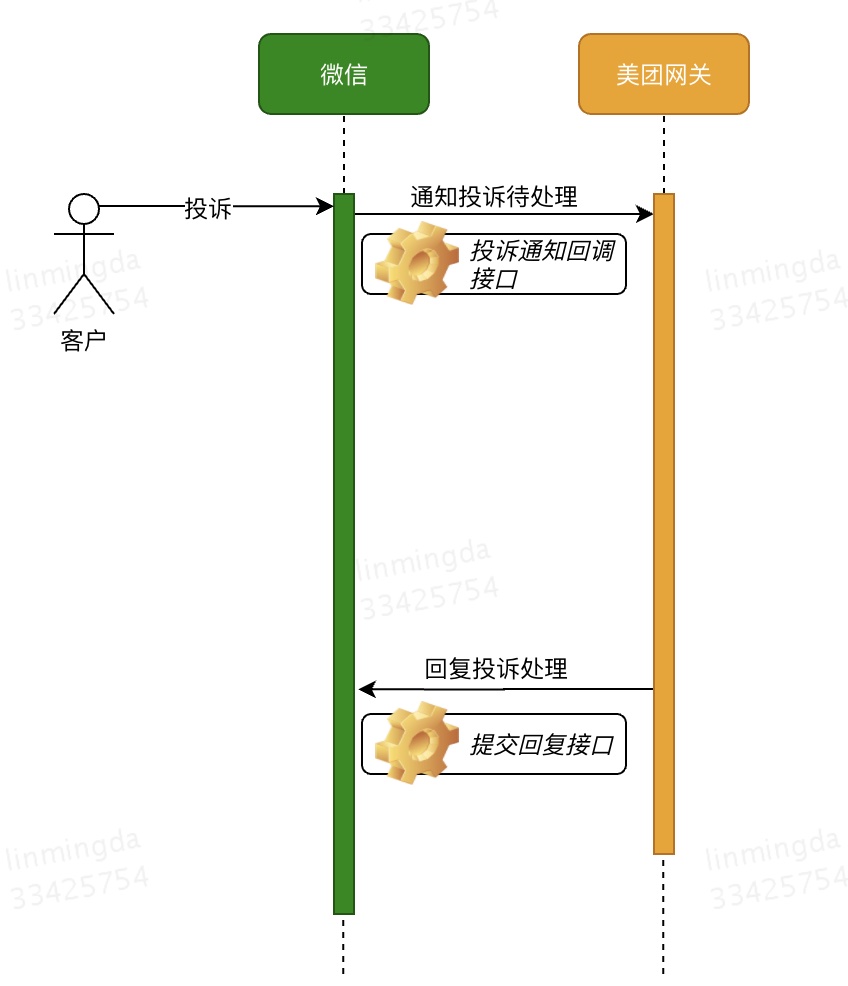
由于需求紧急,产品方案排了两期。一期方案为网管侧直接对微信侧做同步响应,回复消息写死。
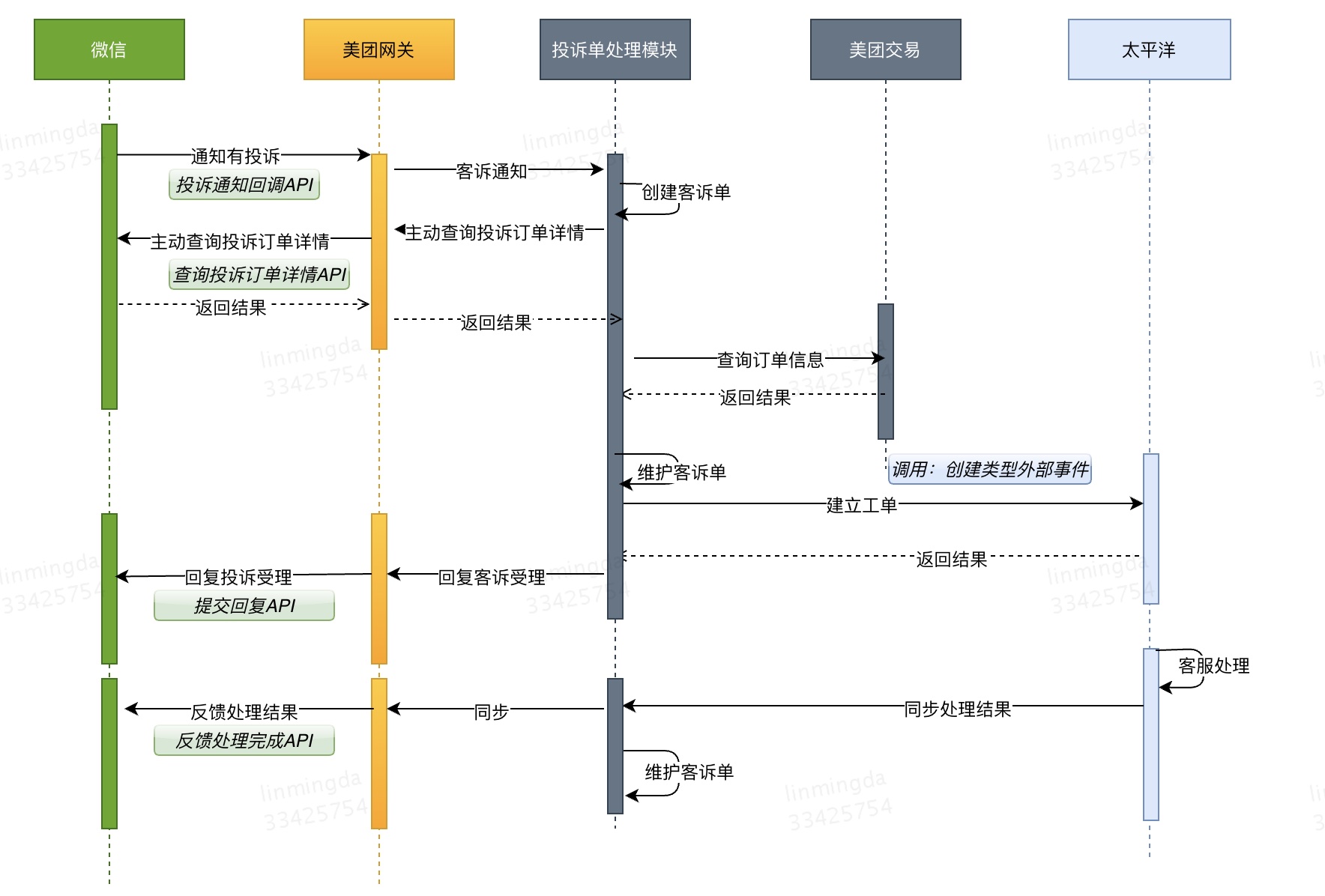
技术方案
一期技术方案
首先,要创建回调地址,在上线前告诉微信侧请求美团网关侧的回调地址。
其次,要写一个controller,实现微信侧「通知回调」接口,处理微信侧的回调请求。
在这个处理controller里,要实现微信侧提供的「提交回复」接口。
一期技术实现
创建回调地址
参考文档
在当时我的实现思路是,在controller新增了一个创建回调地址的方法,然后拿postman去请求这个controller,然后利用这个controller请求微信侧的「创建回调地址」接口。
1
2
3
4
5
6
7
8
9
10
11
12
13
14
15
16
17
18
19
20
21
22
23
24
25
26
27
28
| @RequestMapping(value = "/newCallbackUrl", method = RequestMethod.POST)
public String newCallbackUrl(HttpServletRequest request, HttpServletResponse response) throws IOException {
String requestUrl = "https://api.mch.weixin.qq.com/v3/merchant-service/complaint-notifications";
String callbackUrl = "https://paygate-staging-yf.pay.st.meituan.com/paygate/notify/complaint/app";
Short payType = PayType.PAY_TYPE_WXPAYSCORE_APP;
WxConfig wxConfig = WxConfig.wxConfigMap.get(payType + "");
Map<String, String> requestMap = new HashMap<>();
requestMap.put("url", callbackUrl);
String requestMsg = JSON.toJSONString(requestMap);
long timestamp = WxPayUtil.getCurrentTimestamp();
String nonce = WxPayUtil.generateNonceStr();
String signature = SignUtil.signRSA(requestMsg, HttpRequestTypeEnum.POST, requestUrl, timestamp, nonce, wxConfig.getPrivateKey());
HttpResponseModel responseModel = HttpUtils.httpPost(requestUrl, requestMsg, wxConfig.getPlatformCertificateNo(), WxPayScoreServiceImpl.getAuthorization(wxConfig, signature, timestamp, nonce), new HashMap<>(), null);
Map<String, String> header = responseModel.getHttpHeader();
String ret = JSON.toJSONString(header);
String responseData = responseModel.getResponseData();
ret += ("\n" + responseData);
System.out.println(responseData);
response.setStatus(200);
response.setContentType("application/json;charset=UTF-8");
response.getWriter().write(responseData);
response.getWriter().flush();
response.getWriter().close();
return ret;
}
|
业务线处理函数
微信提供了若干种支付方式:JSAPI、APP、H5、Native、小程序等。由于充电宝业务只接入了Native和小程序两个接口。所以在处理的时候,要分别进行响应处理。
1
2
3
4
5
6
7
8
9
10
11
12
13
| @RequestMapping(value = "/app/complaint", method = RequestMethod.POST)
public void app(HttpServletRequest request, HttpServletResponse response) {
response.setStatus(500);
Short payType = PayType.PAY_TYPE_WXPAYSCORE_APP;
doProcess(payType, request, response);
}
@RequestMapping(value = "/applets/complaint", method = RequestMethod.POST)
public void applets(HttpServletRequest request, HttpServletResponse response) {
response.setStatus(500);
Short payType = PayType.PAY_TYPE_WXPAYSCORE_APPLETS;
doProcess(payType, request, response);
}
|
处理函数
整个处理部分包含了三个部分:
- 加签
- 响应回调请求
- 调用回复接口
1
2
3
4
5
6
7
8
9
10
11
12
13
14
15
16
17
18
19
20
21
22
23
24
25
26
27
28
29
30
31
32
33
34
35
36
37
38
39
40
| private void doProcess(Short payType, HttpServletRequest request, HttpServletResponse response) {
WxConfig wxConfig = WxConfig.wxConfigMap.get(payType + "");
try {
String reqContext = WxUtil.parseReqByte(request);
Map<String, Object> reqMap = new Gson().fromJson(reqContext, HashMap.class);
log.info("WxPayComplaint request payType:{}, data:{}", payType, reqMap);
if (reqMap == null || reqMap.size() <= 0) {
return;
}
Map<String, String> reqWxResource = (Map<String, String>) reqMap.get("resource");
String notifyContext = WxPayUtil.decryptToString(wxConfig.getApiKey(), String.valueOf(reqWxResource.get("associated_data")),
String.valueOf(reqWxResource.get("nonce")), String.valueOf(reqWxResource.get("ciphertext")));
Map<String, String> notifyContextMap = WxUtil.jsonStrToMap(notifyContext);
String msgId = String.valueOf(reqMap.get("id"));
String complaintID = notifyContextMap.get("complaint_id");
String complainedMchId = wxConfig.getMchId();
String actionType = notifyContextMap.get("action_type");
log.info("msgId:{},complaintId:{},actionType:{}", msgId, complaintID, actionType);
response.setStatus(200);
response.setContentType("application/json;charset=UTF-8");
response.setHeader("Pragma", "No-cache");
response.setHeader("Cache-Control", "no-cache");
response.setDateHeader("Expires", 0);
Map<String, String> responseMap = new HashMap<>();
responseMap.put("code", "SUCCESS");
responseMap.put("message", "成功");
response.getWriter().write(new Gson().toJson(responseMap));
response.getWriter().flush();
response.getWriter().close();
if ("CREATE_COMPLAINT".equals(actionType) || "CONTINUE_COMPLAINT".equals(actionType)) {
for (int i = 0; i < 2; i++) {
if (submitResponse(complaintID, complainedMchId, wxConfig)) break;
}
}
} catch (Exception e) {
log.error("wxComplaint response notify error: {}", ExceptionUtils.getStackTrace(e));
}
}
|
回复接口实现
参考文档
根据微信侧提供的接口文档,必传参数包括商户id和回复内容,这里的商户id是从微信侧回调报文中获取的,回复内容是写死的。
1
2
3
4
5
6
7
8
9
10
11
12
13
14
15
16
17
18
19
20
21
22
23
24
25
26
27
28
29
| private boolean submitResponse(String complaintID, String complainedMchid, WxConfig wxConfig) throws SendException {
String responseContent = "您的反馈已经收到,我们将尽快联系您处理。";
String suffixUrl = String.format(WxConstants.COMPLAINTS_RESPONSE_URI_SUFFIX, complaintID);
try {
long timestamp = WxPayUtil.getCurrentTimestamp();
Map<String, String> requestMap = new HashMap<>();
requestMap.put("complainted_mchid", complainedMchid);
requestMap.put("response_content", responseContent);
String requestMsg = new Gson().toJson(requestMap);
String nonce = WxPayUtil.generateNonceStr();
String signature = SignUtil.signRSA(requestMsg, HttpRequestTypeEnum.POST, suffixUrl, timestamp, nonce, wxConfig.getPrivateKey());
HttpResponseModel responseModel = HttpUtils.httpPost(WxPayUtil.url + suffixUrl, requestMsg, wxConfig.getPlatformCertificateNo(),
WxPayScoreServiceImpl.getAuthorization(wxConfig, signature, timestamp, nonce), null, null);
if (responseModel != null && responseModel.getHttpStatusCode() == 204) {
log.info("submitResponse success");
return true;
} else {
log.info("submitResponse error");
if (responseModel != null) {
log.info("submitResponse return: \n httpStatusCode:{}, httpHeader: {}, responseData: {}",
responseModel.getHttpStatusCode(), new Gson().toJson(responseModel.getHttpHeader()), responseModel.getResponseData());
}
}
} catch (Exception e) {
log.error("submit response error:{}", ExceptionUtils.getStackTrace(e));
}
return false;
}
|
签名方式
微信侧约定的签名方式是RSA加密。
整个给微信侧签名过程是怎样的?
参考:签名方案、验签方案
单车接入支付宝代扣
项目背景
微信侧要下线单车场景自动续费做产品升级,考虑到用户量较大,美团临时新增支付宝代扣功能。
产品方案
之前美团已经将打车业务接入到支付宝代扣能力建设中,根据和支付宝侧沟通,单车场景接入只需要在签约接口新增子商户字段,此行为不影响其他支付退款接口。
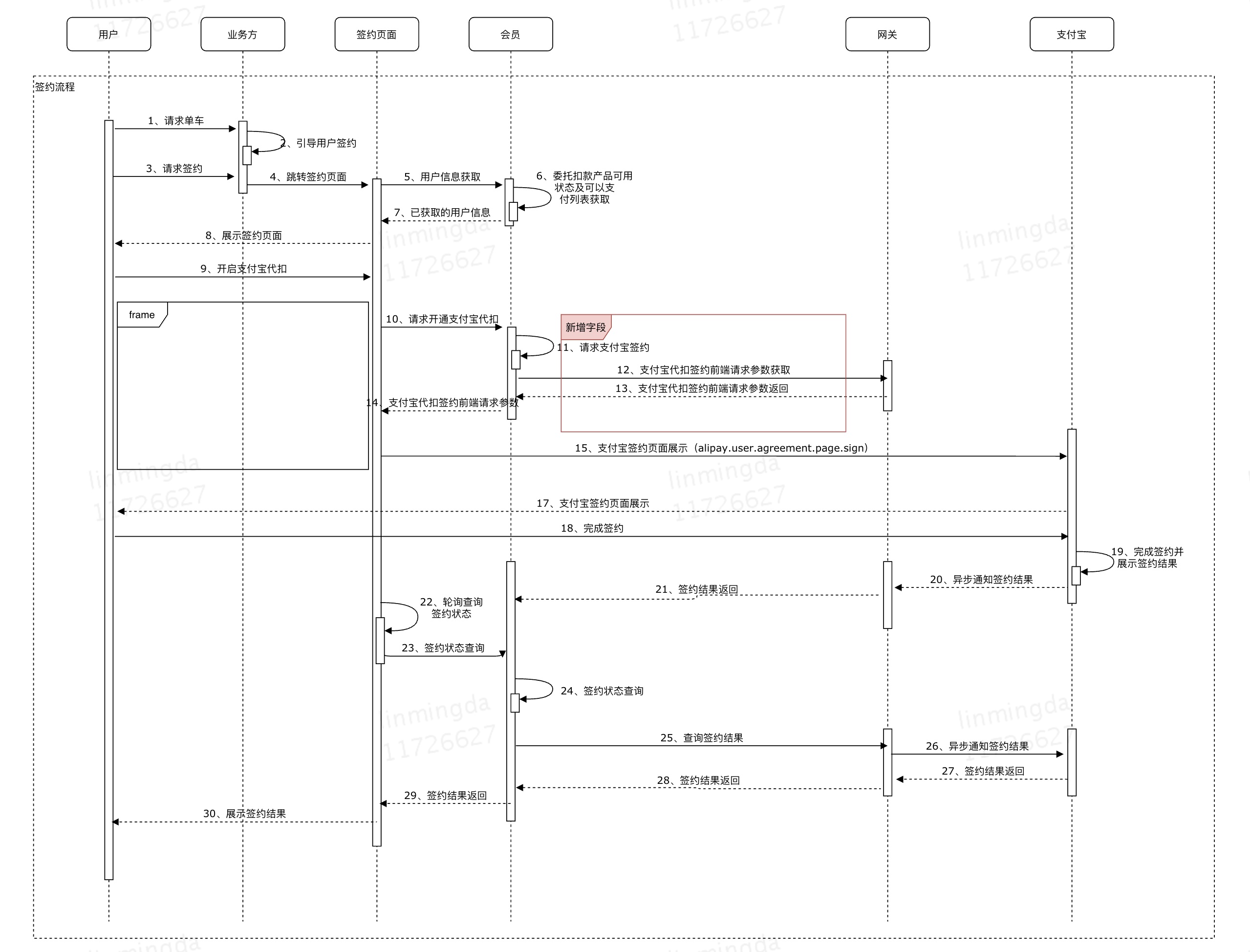
技术方案
通过thrift文件声明一个子商户对象,其中包含若干字段。通过thrift文件生成工具导出为java文件,给上游提供SDK。
在开发过程中,涉及签约接口的部分,要将新添加的字段封装到reqMap中,为请求下游数据封装做铺垫。
RPC框架
为什么要用RPC框架?
对于RPC的解释:
RPC为远程调用服务,调用远端的服务的就像直接在本地调用,本质上来说是一种c/s服务。
在c/s架构服务中,分布式系统采用http通信和采用RPC框架通信的对比分析:
- 从网络资源消耗角度来说,如果业务量庞大,需要反复握手,会有额外的网络开销,RPC框架可以选择合适的通信协议,减少网络开销;
- 从代码开发角度来说,网络通信代码相对冗余,RPC可以类似本地调用一样,写起来简单方便;
- RPC框架一般会有服务注册中心模块,通过该模块,可以实现服务的负载和故障迁移。
thrift的优势有哪些?
- 提供了多种数据序列化方式,常用的binary、json数据序列化格式;
- 支持代码自动生成:可以根据thrift文件定义协议,然后自动生成客户端代码;
- 支持跨语言调用,公司内部使用多种语言,如java、php等,RPC框架可以考虑使用thrift。
DCEP
接口组织结构
基础服务接口
基础服务接口包含支付、支付查询、退款、退款查询。
1
2
3
4
5
6
7
8
9
10
11
| package com.meituan.pay.paygw.service;
public interface IBaseService {
String pay(Map<String, String> reqMap);
String payQuery(Map<String, String> reqMap);
String refund(Map<String, String> reqMap);
String refundQuery(Map<String, String> reqMap);
}
|
dcep通道当前扩展的子接口
dcep扩展的子接口有:开通白名单、发红包、钱包开立状态查询、发红包。
1
2
3
4
5
6
7
8
9
10
11
12
| package com.meituan.pay.paygw.service;
public interface IAllowListService extends IBaseService{
AllowListRespVo supportAllowList(AllowListReqVo allowListReqVo, AllowListRespVo allowListRespVo);
RedPctRespVo supportRedPct(RedPctReqVo redPctReqVo, RedPctRespVo respVo);
WalletStateQueryRespVo walletStateQuery(WalletStateQueryReqVo walletStateQueryReqVo, WalletStateQueryRespVo respVo);
RedPctQueryRespVo redPctQuery(RedPctQueryReqVo redPctQueryReqVo, RedPctQueryRespVo respVo);
}
|
具体开发流程
接口具体实现方法主要有三个步骤:
- 组装上游参数
- 给下游发送请求并解析响应
- 构建响应信息返回给上游
1
2
3
4
5
6
7
8
9
10
11
12
13
14
15
16
17
18
19
20
21
22
23
24
25
26
27
28
29
30
31
32
33
34
35
36
37
38
39
40
41
42
43
44
45
46
47
48
49
50
51
52
53
54
55
56
57
58
59
60
61
62
63
64
65
66
67
68
69
70
71
72
73
74
75
76
77
78
79
80
81
82
83
84
85
86
87
88
89
90
91
92
93
94
95
96
97
98
99
100
101
102
103
104
105
106
107
108
109
110
111
112
113
114
115
116
117
118
119
120
121
122
123
124
125
126
127
128
129
130
131
132
133
134
135
136
137
138
139
140
141
142
143
144
145
146
147
148
149
150
151
152
153
154
155
156
157
158
159
160
161
162
163
164
165
166
167
168
169
170
171
172
173
174
175
176
177
178
179
180
181
182
183
184
185
186
187
188
189
190
191
192
193
194
195
196
197
198
199
200
201
202
203
204
205
206
207
208
209
210
211
212
213
214
215
216
217
218
219
220
221
222
223
224
225
226
227
228
229
230
231
232
233
234
235
236
237
238
239
240
241
242
243
244
245
246
247
248
249
250
251
252
253
254
255
256
257
258
259
260
261
262
263
264
|
public RedPctQueryRespVo buildRedPctQueryRes(String respStr, RedPctQueryRespVo respVo, String payType) {
try {
TokenRedPctQueryResp resp = dcepPsbcConfig.parsePsbcCommonRtn(respStr, TokenRedPctQueryResp.class, payType);
if (resp == null || resp.getHead() == null || resp.getBody() ==null) {
log.error("buildRedPctQueryRes error resp is null");
respVo.response.setErrorCode(ErrorCodeConfig.PAYGATE_COMMON_ERR);
return respVo;
}
logHandler.logBankInter("dcep psbc buildRedPctQueryRes response:" + JacksonUtil.toJson(resp));
String respCode = resp.getBody().getRespCode();
String respMsg = resp.getBody().getRespMsg();
String outNo = resp.getBody().getBusiMainId();
if (BANK_RESP_OK.equalsIgnoreCase(respCode)) {
respVo.setOutNo(outNo);
List<PsbcRedPctActInfo> redPctActInfoList = resp.getBody().getRedpctActInfoList();
List<Object> objectList = new ArrayList<>();
for (PsbcRedPctActInfo item : redPctActInfoList) {
RedPctActInfo redPctActInfo = new RedPctActInfo();
redPctActInfo.setRedPctActNo(item.getRedpctActNo());
if (!"#.##".equals(item.getRedpctActBal()) && StringUtils.isNotBlank(item.getRedpctActBal())) {
redPctActInfo.setRedPctActBal(AmountUtils.y2fLong(item.getRedpctActBal()) + "");
}
redPctActInfo.setRedPctActCode(item.getRedpctActCode());
redPctActInfo.setRedPctActMsg(item.getRedpctActMsg());
objectList.add(redPctActInfo);
}
List<RedPctActInfo> redpctActInfoList = new ArrayList<>();
for (Object item: objectList) {
redpctActInfoList.add((RedPctActInfo) item);
}
respVo.setRedPctActInfoList(redpctActInfoList);
respVo.response.setSuccess(true);
}else {
respVo.response.setSuccess(false);
String gwRtnCode = this.bankCodeToGwRtnCode(respCode, RedPctQueryRespVo.class);
respVo.response.setErrorCode(gwRtnCode);
respVo.response.setErrorMsg(respMsg);
respVo.response.setThirdErrorCode(respCode);
respVo.response.setThirdErrorMsg(respMsg);
}
} catch (Exception e) {
log.error("buildRedPctQueryRes error: {}", ExceptionUtils.getStackTrace(e));
respVo.response.setErrorCode(ErrorCodeConfig.PAYGATE_COMMON_ERR);
}
return respVo;
}
private Map<String, String> buildRedPctQueryParams(RedPctQueryReqVo redPctQueryReqVo) throws PreSendException {
try {
TokenRedPctQueryReq req = new TokenRedPctQueryReq();
TokenRedPctQueryReq.Head head = req.new Head();
head.setPartnerTxSriNo(fmt.format(new Date())+LeafIdGenUtil.getIdByDigit(Config.LEAF_ID,10));
head.setMethod(dcepPsbcConfig.RED_PCT_QUERY_METHOD);
head.setVersion(dcepPsbcConfig.VERSION);
head.setMerchantId(MtConfigUtils.getMccVal(dcepPsbcConfig.MERCHANT_ID));
head.setAppID(MtConfigUtils.getMccVal(dcepPsbcConfig.APP_ID));
head.setReqTime(fmt.format(new Date()));
head.setAccessType(dcepPsbcConfig.ACCESS_TYPE);
head.setReserve("");
req.setHead(head);
TokenRedPctQueryReq.Body body = req.new Body();
body.setBusiMainId(redPctQueryReqVo.getOutNo());
body.setReqTransTime(fmt.format(new Date()));
body.setPhone(redPctQueryReqVo.getUserCellphone());
List<RedPctActInfo> redPctActInfoList = redPctQueryReqVo.getRedPctActInfoList();
if (null == redPctActInfoList || redPctActInfoList.isEmpty() || StringUtils.isBlank(redPctActInfoList.get(0).getRedPctActNo())) {
log.error("RedPctActNo can't be empty");
throw new PreSendException(ErrorCodeConfig.ILLEGAL_ARGUMENT);
}
List<String> redpctActList = new ArrayList<>();
for (RedPctActInfo item: redPctActInfoList) {
redpctActList.add(item.getRedPctActNo());
}
body.setRedpctActList(redpctActList);
body.setWltId(MtConfigUtils.getMccVal(DcepPsbcConfig.WltId));
req.setBody(body);
return dcepPsbcConfig.assemblePsbcCommonReq(req, redPctQueryReqVo.getPayType()+"");
} catch (PreSendException e) {
throw e;
} catch (Exception e) {
log.error("buildWalletStateQueryParams error :{}", ExceptionUtils.getStackTrace(e));
throw new PreSendException(ErrorCodeConfig.ILLEGAL_ARGUMENT);
}
}
public static String doPostWithContentType(String urlStr, String reqContent, int connectTimeout, int socketTimeout, String encoding) throws Exception {
StringBuilder resStr = new StringBuilder();
BufferedReader in = null;
HttpURLConnection connection = null;
HttpsURLConnection connections = null;
OutputStream out = null;
boolean isOnline = CommonConfig.isOnline();
trustAllHosts();
try {
URL url = new URL(urlStr);
if("https".equals(urlStr.substring(0, 5))){
connections = (HttpsURLConnection) url.openConnection();
connections.setConnectTimeout(connectTimeout);
connections.setReadTimeout(socketTimeout);
connections.setRequestMethod("POST");
connections.setDoOutput(true);
connections.setRequestProperty("accept", "*/*");
connections.setRequestProperty("Content-Type", "application/json;charset=UTF-8");
connections.setRequestProperty("Content-Length", reqContent.length()+"");
connections.setHostnameVerifier(new MyHostnameVerifier());
logger.info("https connecting...");
connections.connect();
logger.info("https connected!");
out = connections.getOutputStream();
out.write(reqContent.getBytes(encoding));
String httpCode = Integer.toString(connections.getResponseCode());
logger.info("httpCode:{}",httpCode);
if(!"200".equals(httpCode)) {
throw new Exception("HTTPS通信失败:" + httpCode);
}
in = new BufferedReader(new InputStreamReader(connections.getInputStream(), encoding));
String line;
while((line = in.readLine()) != null) {
resStr.append(line).append("\r\n");
}
}else {
connection = (HttpURLConnection) url.openConnection();
connection.setConnectTimeout(connectTimeout);
connection.setReadTimeout(socketTimeout);
connection.setRequestMethod("POST");
connection.setDoOutput(true);
connection.setRequestProperty("accept", "*/*");
connection.setRequestProperty("Content-Type", "application/json;charset=UTF-8");
connection.setRequestProperty("Content-Length", reqContent.length()+"");
logger.info("http connecting...");
connection.connect();
logger.info("http connected!");
out = connection.getOutputStream();
out.write(reqContent.getBytes(encoding));
String httpCode = Integer.toString(connection.getResponseCode());
logger.info("httpCode:{}",httpCode);
if(!"200".equals(httpCode)) {
throw new Exception("HTTP通信失败:" + httpCode);
}
in = new BufferedReader(new InputStreamReader(connection.getInputStream(), encoding));
String line;
while((line = in.readLine()) != null) {
resStr.append(line).append("\r\n");
}
}
} catch(Exception e) {
throw e;
} finally {
try {
if(out != null) {
out.close();
}
if(connection != null) {
connection.disconnect();
}
if(connections != null) {
connections.disconnect();
}
if(in != null) {
in.close();
}
} catch (Exception e) {
out = null;
in = null;
connection = null;
logger.error("exception while sendByHttps/Http:" + e);
}
}
return resStr.toString();
}
public RedPctQueryRespVo buildRedPctQueryRes(String respStr, RedPctQueryRespVo respVo, String payType) {
try {
TokenRedPctQueryResp resp = dcepPsbcConfig.parsePsbcCommonRtn(respStr, TokenRedPctQueryResp.class, payType);
if (resp == null || resp.getHead() == null || resp.getBody() ==null) {
log.error("buildRedPctQueryRes error resp is null");
respVo.response.setErrorCode(ErrorCodeConfig.PAYGATE_COMMON_ERR);
return respVo;
}
logHandler.logBankInter("dcep psbc buildRedPctQueryRes response:" + JacksonUtil.toJson(resp));
String respCode = resp.getBody().getRespCode();
String respMsg = resp.getBody().getRespMsg();
String outNo = resp.getBody().getBusiMainId();
if (BANK_RESP_OK.equalsIgnoreCase(respCode)) {
respVo.setOutNo(outNo);
List<PsbcRedPctActInfo> redPctActInfoList = resp.getBody().getRedpctActInfoList();
List<Object> objectList = new ArrayList<>();
for (PsbcRedPctActInfo item : redPctActInfoList) {
RedPctActInfo redPctActInfo = new RedPctActInfo();
redPctActInfo.setRedPctActNo(item.getRedpctActNo());
if (!"#.##".equals(item.getRedpctActBal()) && StringUtils.isNotBlank(item.getRedpctActBal())) {
redPctActInfo.setRedPctActBal(AmountUtils.y2fLong(item.getRedpctActBal()) + "");
}
redPctActInfo.setRedPctActCode(item.getRedpctActCode());
redPctActInfo.setRedPctActMsg(item.getRedpctActMsg());
objectList.add(redPctActInfo);
}
List<RedPctActInfo> redpctActInfoList = new ArrayList<>();
for (Object item: objectList) {
redpctActInfoList.add((RedPctActInfo) item);
}
respVo.setRedPctActInfoList(redpctActInfoList);
respVo.response.setSuccess(true);
}else {
respVo.response.setSuccess(false);
String gwRtnCode = this.bankCodeToGwRtnCode(respCode, RedPctQueryRespVo.class);
respVo.response.setErrorCode(gwRtnCode);
respVo.response.setErrorMsg(respMsg);
respVo.response.setThirdErrorCode(respCode);
respVo.response.setThirdErrorMsg(respMsg);
}
} catch (Exception e) {
log.error("buildRedPctQueryRes error: {}", ExceptionUtils.getStackTrace(e));
respVo.response.setErrorCode(ErrorCodeConfig.PAYGATE_COMMON_ERR);
}
return respVo;
}
|
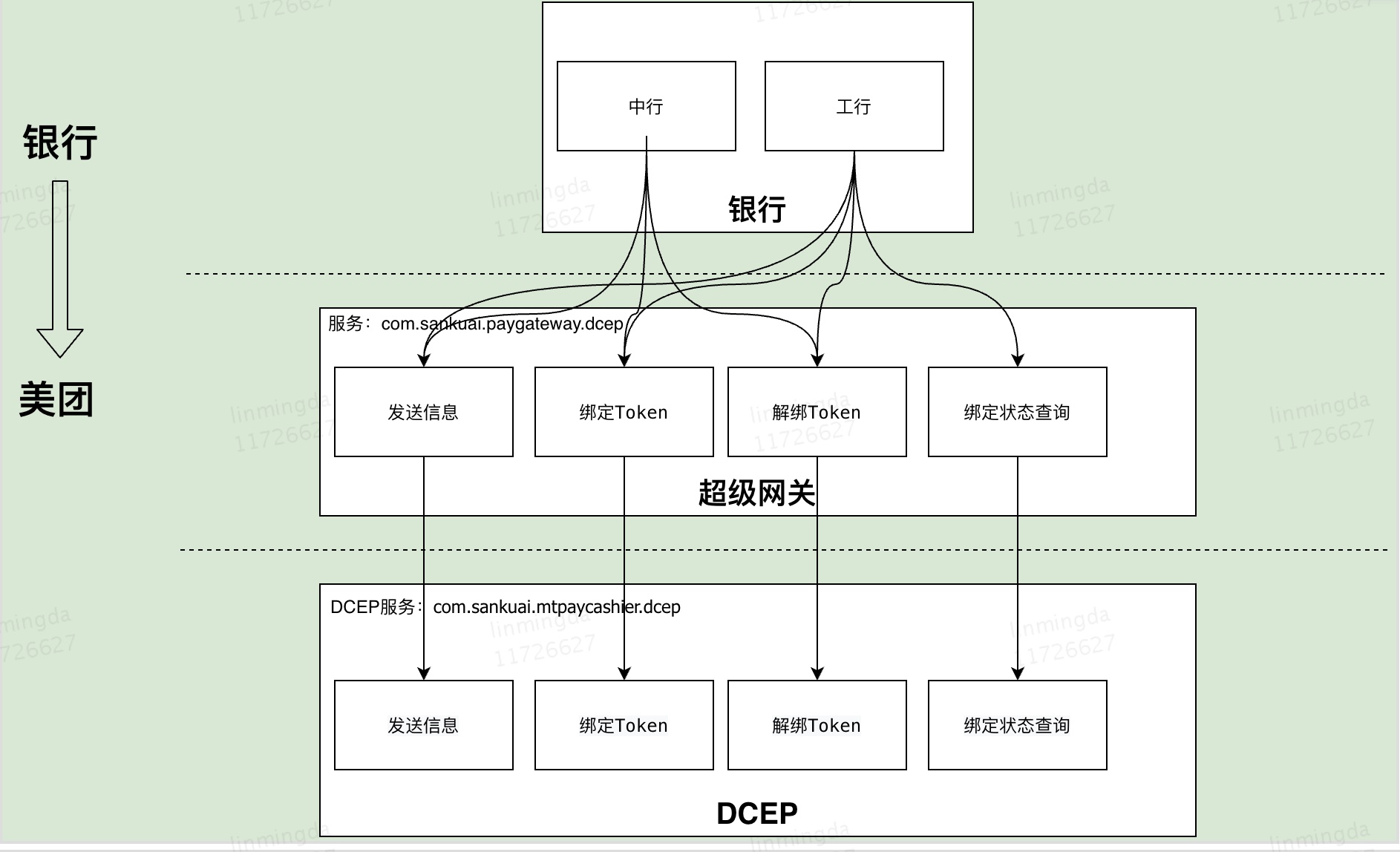
DCEP全链路梳理
网关接口调用关系
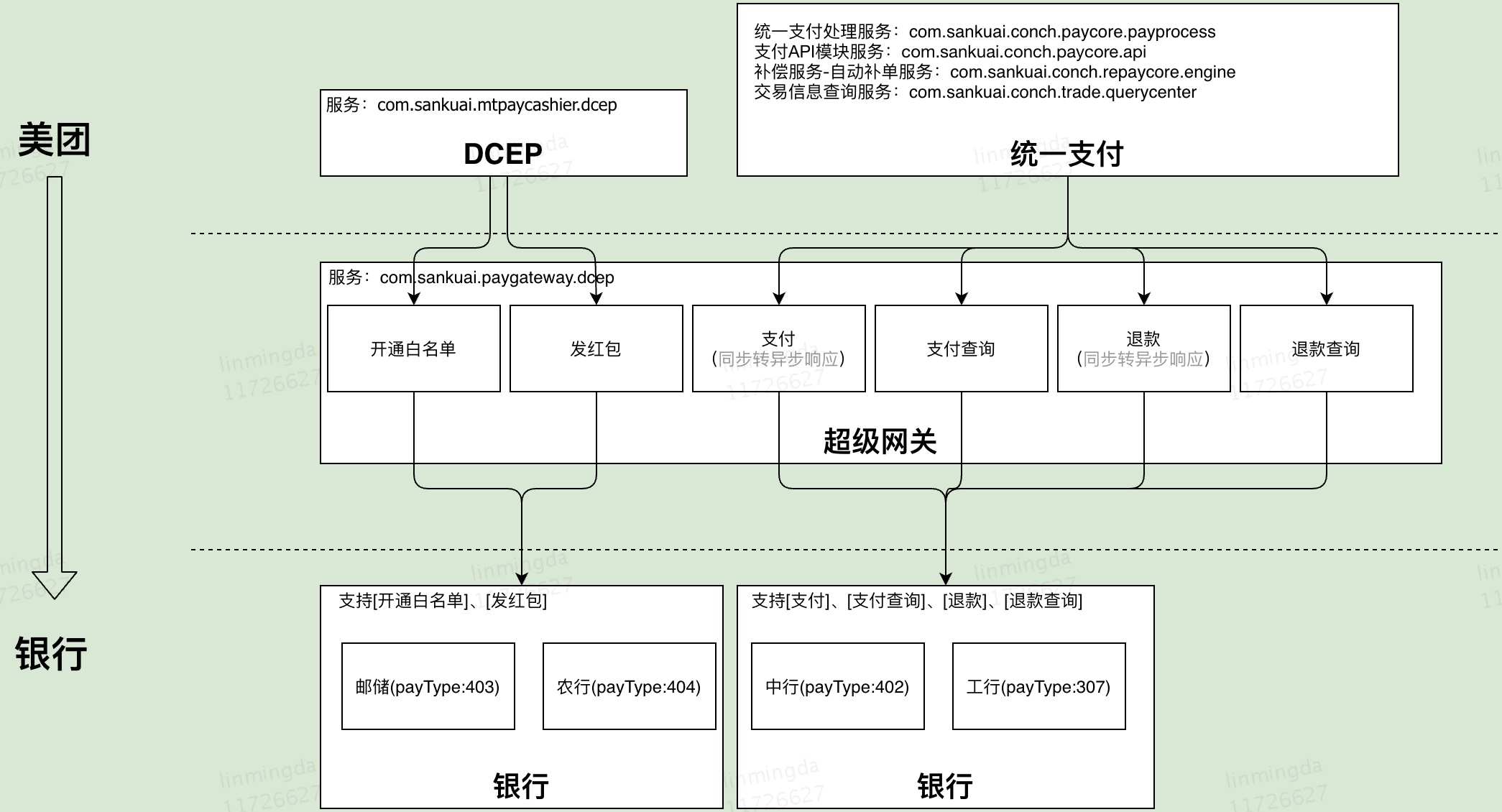
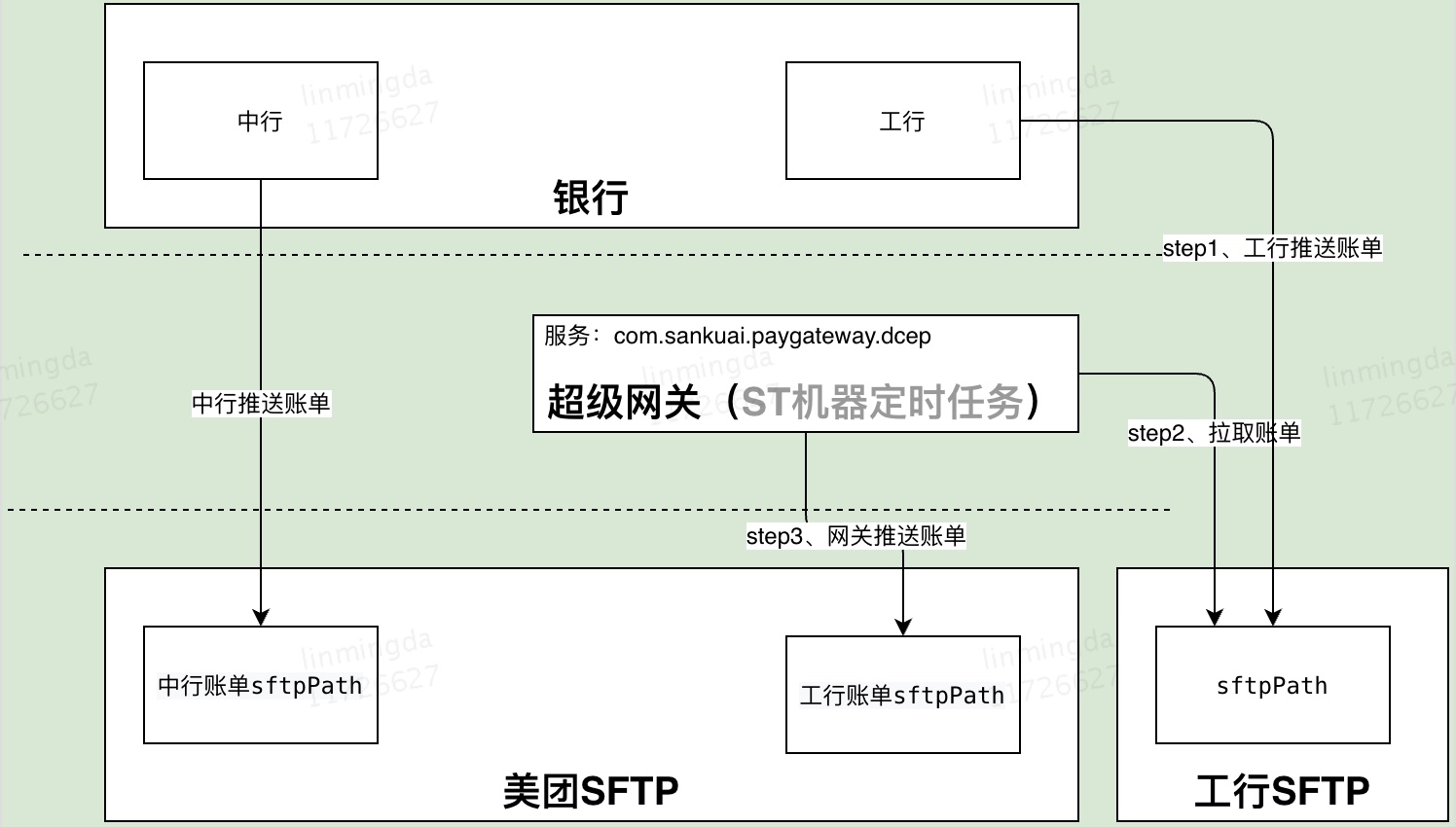
网关新平台建设
需求点
- 工具类:JSON格式校验,拼接JSON
- 分页查询
- 页面迁移
前后端交互流程
技术点
数据库读写分离
MySQL读写分离,索引,最左匹配原则。
Spring MVC原理
从Spring MVC原理出发,解释页面迁移的过程。
技术细节梳理
签名
dcep
- 生成sm4key并对明文用sm4key对称加密
- 使用sm2对sm4key和publickey进行加密得到加密的sm4key
- 将加密请求报文和加密sm4key拼装成传输报文,再用私钥进行加密